
Sound design for Premiere Pro, right on your timeline.
Needs a paid plan. Plans from $12.
Updated
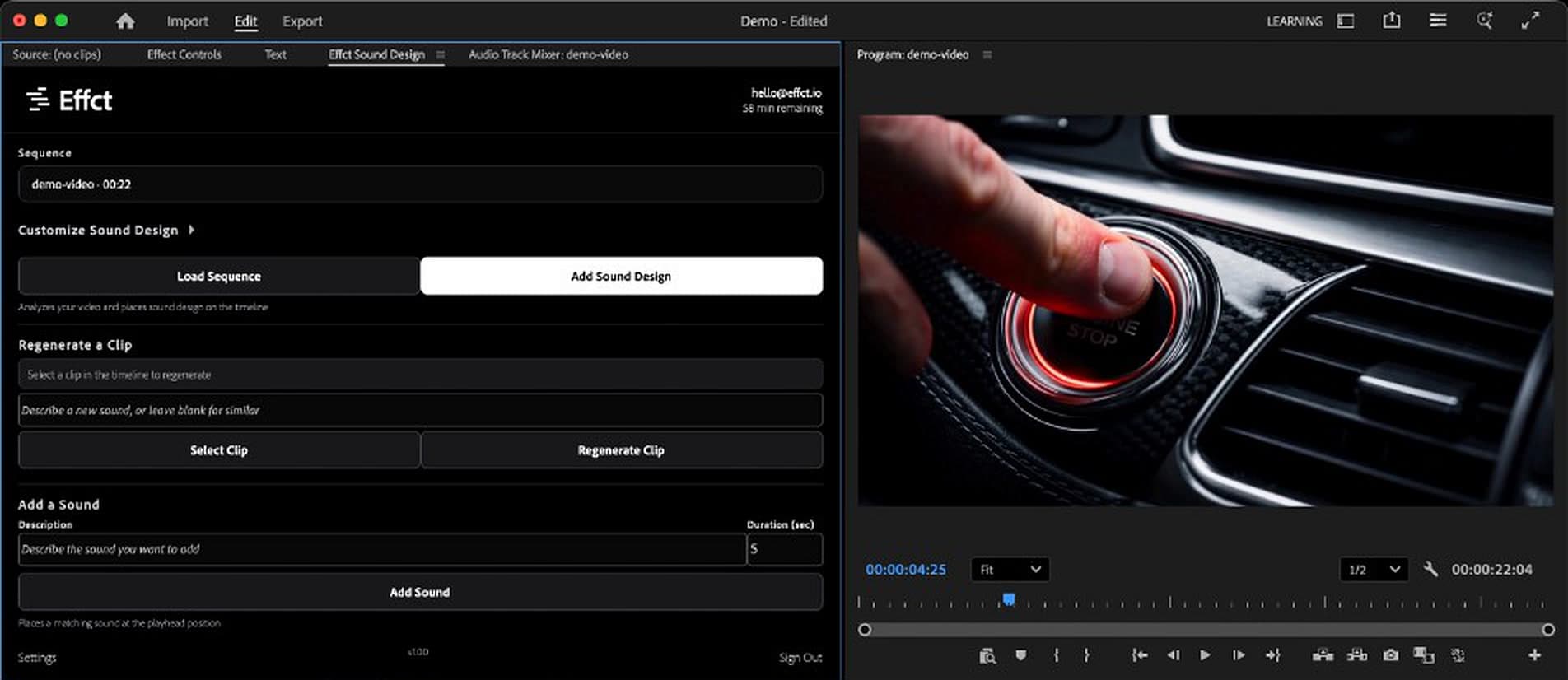
Effct for Premiere Pro is a panel for Premiere Pro 25.6 or later. Load your sequence, mark In and Out if you want part of it, click Add Sound Design, and Effct places ambience, sound effects and design sounds back on your timeline, each Effct track on its own audio track and every sound its own clip. Swap a clip or add a sound at the playhead without leaving Premiere. It's included with every paid plan.
How it works in Premiere
Get Effct from Adobe Exchange, open the Effct Sound Design panel and sign in with your Effct account.
Open your sequence and click Load Sequence. Set In and Out to work on part of it.
On Creator and up, open Customize Sound Design to pick the style (Full Coverage, Minimal, Atmospheric or Cinematic), the layers and the vibe.
Click Add Sound Design. The sounds land on new audio tracks, each one a clip you can trim, move and mix.
Select an Effct clip and click Regenerate Clip to swap it, or describe a sound and its length under Add a Sound to place it at the playhead.
Clips, not a bounced track
Every sound is a separate clip on your timeline, on audio tracks of its own, so you trim, move and mix it in Premiere like anything else you cut.
Cut sequence? Render it first
The panel works on a range covered by one clip at normal speed. For an edited sequence, export it as one video, place it in a new sequence, and run Effct there.
Can Effct export stems or AAF for Premiere?
Yes. From the Effct editor in your browser, Creator ($29) and up exports WAV stems, one per sound category, and Pro ($49) and up exports an AAF with linked WAV files, for Premiere Pro and other editors.
Every paid plan includes the panel. It uses your plan's minutes. See pricing
Frequently asked questions
Which Premiere Pro versions does it support?
Premiere Pro 25.6 or later.
Which plans include it?
Every paid plan, from Starter at $12 a month. It uses your plan's minutes.
Does the free trial work in Premiere?
No. Try Effct free in your browser first. Free: the first 30 seconds of one video, previewed in the editor. Exporting needs a paid plan.
Can it sound-design an edited sequence?
Not directly yet. The panel works on a range covered by one clip at normal speed. For an edited sequence, export it as one video, place it in a new sequence, and run Effct there.
What gets uploaded?
The source file of the clip you process. Effct works on the range you marked.
Can I choose the style?
Yes, on Creator and up, in the panel's Customize Sound Design section: Full Coverage, Minimal, Atmospheric or Cinematic, plus the layers and the vibe.
Can Effct export stems or AAF for Premiere?
Yes. From the Effct editor in your browser, Creator ($29) and up exports WAV stems, one per sound category, and Pro ($49) and up exports an AAF with linked WAV files, for Premiere Pro and other editors.
Free: the first 30 seconds of one video, previewed in the editor. Exporting needs a paid plan.